Skip to content
UBOTIE
EN
Amazon Store

UBOTIE Keyboard and Mouse Combos With Retro Round Keys

UBOTIE keyboards are designed for people who want their workspace to feel like them. Round typewriter keycaps, bold multicolor finishes and a wireless connection that works the moment you plug it in.

Connection
2.4 GHz USB receiver or Bluetooth
Keys
84 to 110, by model
Range
Up to 33 ft (10 m)
Setup
No drivers to install

How to Connect a UBOTIE Keyboard

There are two ways our keyboards connect. Combos with a mouse use a small USB receiver and need no pairing at all. The compact 84-key keyboard is Bluetooth and pairs with phones, tablets and computers.

Keyboard and Mouse Combos (USB Receiver)

  1. Find the Receiver

    The USB nano receiver is stored in the mouse, near the battery compartment. One receiver runs both the keyboard and the mouse.

  2. Add Batteries and Switch On

    Put batteries in the keyboard and the mouse. On sets with their own power switches, slide both switches on.

  3. Plug In and Type

    Insert the receiver into a USB port on your computer. There are no drivers or software to install: Windows and macOS pick it up on their own. A tablet or phone needs a USB adapter.

Portable 84-Key Keyboard (Bluetooth)

  1. Insert Two AAA Batteries

    The keyboard runs on two AAA batteries. They are not included, and they are not the rechargeable kind.

  2. Turn It On and Pick a Channel

    Slide the On/Off switch, then choose BT1, BT2 or BT3. Each channel keeps its own device.

  3. Pair From Your Device

    Put the keyboard in pairing mode with the key combination shown in the manual for your version, open Bluetooth settings on your phone, tablet or computer and select the UBOTIE keyboard.

  4. Switch Between Devices

    Press another channel key to move from your laptop to your phone. The keyboard reconnects quickly after it wakes from sleep.

If Your UBOTIE Keyboard Is Not Working

  • Start With Fresh Batteries

    Weak batteries are the usual reason for lag, missed keys or a keyboard that will not turn on.

  • Check the Power Switch

    On many models the keyboard and the mouse each have their own switch. Both also sleep to save battery: press any key to wake them.

  • Plug the Receiver Straight In

    Use a USB port on the computer itself rather than a hub, and stay within about 33 ft (10 m).

  • Mouse Works, Keyboard Does Not

    Both share one receiver, so the receiver is fine. Look at the keyboard batteries and its power switch.

  • Bluetooth Will Not Pair

    Remove the old UBOTIE entry from the Bluetooth list on your device, switch the keyboard off and on, and pair again on a free channel.

  • Shortcut Keys on a Mac

    On newer versions of macOS some shortcut keys may not work. Typing itself is not affected.

UBOTIE Keyboards and Colors

Four families, each in several colorways. Tap a color to open it on Amazon.

Colorful Keyboard and Mouse Combos 6 colors

Full-size keys2.4 GHz USB nano receiverWindows 7/8/10/11 and macOS

The UBOTIE everyone knows: full-size keyboards with floating, typewriter-style round keys on a mirror-finish panel, plus a matching optical mouse. The 2026 color coating resists fading with daily use.

110-Key Silent Combos 3 colors

110 round keycapsNumber pad, 12 Fn shortcutsSleeps after 8 minutes idle

Our quietest set. Silicone membranes soften every keystroke, so you can type in a library or a shared office. A full number pad and 12 Fn media shortcuts sit next to the round keys.

Rainbow and Two-Tone Combos 3 colors

Separate power switches2.4 GHz USB receiverFade-resistant keycaps

Gradient rainbow keys or bold two-tone round keycaps. The keyboard and the mouse each have their own power switch, so you can use them together or apart.

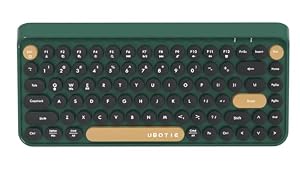
Portable Bluetooth 84-Key Keyboards 6 colors

84 keys, compactBluetooth, 3 channels2 AAA batteries, not included

A compact keyboard without a mouse, made for phones, tablets and laptops. Three Bluetooth channels hold three devices, with a range of about 33 ft (10 m) and an On/Off switch.

See Every UBOTIE Keyboard on Amazon

Which UBOTIE Keyboard Fits You

Choose by how you connect and whether you want a mouse in the box. After that it comes down to color.

FamilyKeysConnectionMouseWorks With
Colorful CombosFull-size2.4 GHz receiverIncludedWindows, macOS
110-Key Silent110, number pad2.4 GHz receiverIncludedWindows, Mac, laptops
Rainbow and Two-ToneFull-size2.4 GHz receiverIncludedWindows, macOS, tablets with adapter
Portable Bluetooth84, compactBluetooth, 3 channelsNoWindows, Mac, iOS, Android

About the UBOTIE Keyboard

UBOTIE keyboards are designed for people who want their workspace to feel like them. Combining a retro typewriter aesthetic with modern wireless performance, each keyboard features smooth round keycaps, bold multicolor finishes and a plug-and-play USB receiver: no drivers, no fuss.

Whether you're typing up reports, studying or just refreshing your desk setup, UBOTIE delivers reliable 2.4GHz connectivity and a satisfying typing feel in a design that stands out. Keyboard and mouse combos come in a wide range of colors, from soft pastels to vibrant gradients, so you can find the one that fits your style.

Simple to set up. Easy to love. That's the UBOTIE keyboard experience.

  • Enhanced Mobility

    Wireless design offers flexibility, allowing you to use it anywhere, reducing clutter and freeing up desk space.

  • Stylish Variety

    Available in many colors, from pink, purple, blue and green to milk tea and wine red, with colorful keycaps to match your style.

  • Mirror-Finish Panel

    On the colorful combos each round key reflects softly in a glossy panel that wipes clean in seconds.

  • Battery Saving

    Every UBOTIE keyboard sleeps on its own when you stop typing and wakes with a key press.

Our Happy Clients

The retro design with colorful keycaps adds a fun touch to my workspace. I can work from anywhere in the room, thanks to Bluetooth 5.1.

Jane SmithTech Enthusiast

I needed a keyboard that could handle hours of typing assignments and projects. The UBOTIE keyboard not only feels great with its soft clicking sound, but it's also super portable. I got the pink-white version, and it's a hit among my friends. Perfect for both work and play!

David JohnsonStudent

I can't get enough of the UBOTIE VS Pink wireless keyboard! The retro typewriter-style keys make typing a breeze, and the Bluetooth connectivity is a lifesaver. I often switch between my laptop and smartphone, and this keyboard seamlessly connects to both. Plus, it's a trendy accessory that sparks conversations. Love it!

Sarah MillerContent Writer

UBOTIE Keyboard Questions

What Is UBOTIE?

UBOTIE is a brand of colorful wireless keyboards and keyboard and mouse combos with round, typewriter-style keys. You can buy them in the UBOTIE store on Amazon.

How Do I Connect a UBOTIE Wireless Keyboard?

Take the USB nano receiver out of the mouse (it sits near the battery compartment), put batteries in the keyboard and mouse, switch them on and plug the receiver into a USB port. No drivers are needed.

How Do I Pair a UBOTIE Bluetooth Keyboard?

Insert two AAA batteries, slide the On/Off switch, choose channel BT1, BT2 or BT3 and put the keyboard in pairing mode. Then select the UBOTIE keyboard in the Bluetooth settings of your phone, tablet or computer.

How Do I Turn On a UBOTIE Keyboard?

Slide the power switch on the keyboard and, on sets that have one, the switch on the mouse. If the keyboard was idle it may be asleep: press any key to wake it.

Where Is the USB Receiver?

On UBOTIE keyboard and mouse combos the nano receiver is stored inside the mouse, near the battery compartment. The same receiver works for both devices.

Why Is My UBOTIE Keyboard Not Working?

Replace the batteries first, then check that the power switch is on. Plug the receiver directly into the computer, not a hub. If the mouse works but the keyboard does not, the problem is the keyboard batteries or its switch.

Does a UBOTIE Keyboard Work With a Mac?

Yes. The combos work with Windows 7/8/10/11 and macOS, and the Bluetooth keyboard works with Mac OS too. On newer macOS versions some shortcut keys may not work.

Can I Use a UBOTIE Keyboard With an iPad or Phone?

The portable Bluetooth keyboard pairs with iOS and Android phones and tablets. Combos with a USB receiver need a USB adapter to work with a tablet or phone.

How Many Devices Can the Bluetooth Keyboard Remember?

Three. It has BT1, BT2 and BT3 channels, so a computer, a tablet and a phone can each keep their own channel.

What Batteries Does the UBOTIE Bluetooth Keyboard Use?

Two AAA batteries. They are not included and the keyboard is not rechargeable.

Are UBOTIE Keyboards Quiet?

The 110-key silent combos are the quietest, with silicone membranes that dampen every keystroke. The colorful combos have a smooth, light clicking feel.

Will the Colors Fade?

The colorful combos use an updated color coating that resists fading with daily use, and the rainbow keycaps are made to keep their color too.

Contact UBOTIE

Questions about your keyboard or mouse? Write to us.

info@ubotiekeyboard.com MAYLERESCAPE LIMITED
Unit 2052, 275 New North Road, London, United Kingdom, N1 7AA